Tape backup was once the norm for archiving files from home PCs. Consumer grade tape drives tended to be flaky and slow, but were the only alternative to using dozens of floppy disks. With DVD burners priced as low as $50 for dual-layer burning, it almost seems unnecessary to think about tape backup solutions. Tape storage still has advantages, particularly if you want to make a more permanent archive to store in a lockbox in case of fire. Instead of investing in a tape drive and expensive tape media, your Digital Video camera and affordable MiniDV tapes provide a resource for 10-15GB backups compatible with millions of drive units available in homes all over the country.
Dual-layer DVD+/-R blanks currently cost $5-7 each, storing a maximum of 8.5GB of data. Single-layer DVD blanks remain a cheaper option, but don't work well for backing up large video project files. The average price for MiniDV tape in consumer quantities is about $4 or as low as $2.60 in 100 unit lots. MiniDV tape stores 8-12GB in SP mode or 12-18GB in LP mode, depending on how much compression is used during the backup process. The new 80min MiniDV tapes hold as much as 22GB in LP mode.
The one catch in using MiniDV tape as a backup solution is compatibility. Computers are designed to recognize DV cameras as a video source, not as tape drives. You need software to make the connection. Firestreamer is the one reliable solution I've found for consistently backing up data to MiniDV tape and restoring from MiniDV tape. Firestreamer acts as a bridge between your DV camera and the Windows XP Backup software.
When backing up to MiniDV tape, make sure your DV camera is plugged into a power source (so the batteries don't die mid-backup). Connect the camera using the FireWire (IEEE-1394 or iLINK) connection. Insert a blank tape. Open Firestreamer and click Launch Backup Utility. If you backup to a DV tape previously used to record video, Firestreamer warns that it will prepare the media and erase anything on the tape.
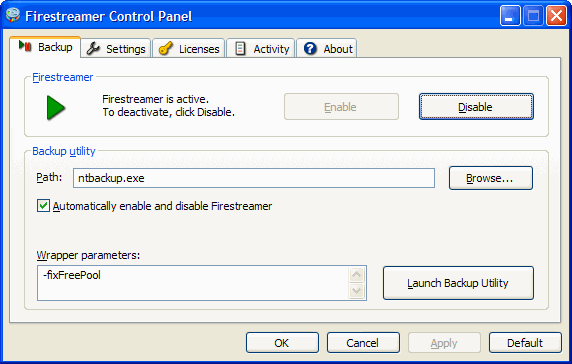
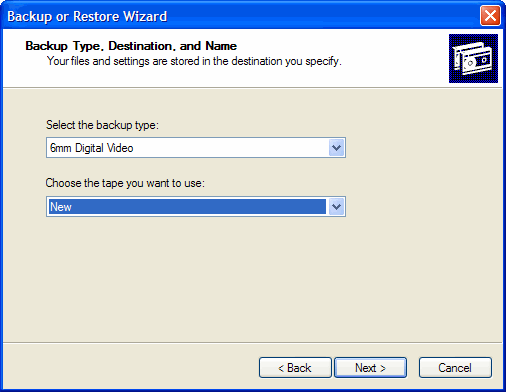
Once Firestreamer configures your DV camera, you walk through the Backup wizard. When you get to the option to select backup type, choose 6mm Digital Video and accept the default 'New' tape. If the files you choose to backup are larger than the storage available on one MiniDV tape, Firestreamer, in combination with the backup software. From this point on, the Backup software manages the process just like you would if backing up to DVD, CD or any other media type.
Mac OS X requires the DV Backup app from Tim Hewett's Coolatoola.com. Unlike the Windows Firestreamer solution, DV Backup is a self-contained backup solution for Mac OS X. DV Backup handles the tape management as well as configuring and executing the actual backup process. DV Backup sells for $50, with an LE version priced at $20. The LE version lacks tape spanning and selectable file recovery options and does not support scheduled backups. DV Backup supports maxium storage sizes of 11.5GB in SP mode or 17.5GB in LP mode.
Linux users can achieve similar results with the command line dvbackup tool available at Source Forge. In theory, an industrious Windows programmer could write a GUI and recompile the code for this app to create an open source alternative to Firestreamer.
How Fast is Backing up to MiniDV?
According to the DV Backup help files, expect to transfer approximately 187MB per minute with no protection or about 94MB per minute using the full duplication mode. My own experience using Firestreamer is about one hour to fill an SP mode MiniDV tape with no compression. Your mileage may vary.


No comments:
Post a Comment